Resources · Getting found in AI
How to claim your business in ChatGPT
ChatGPT now lets businesses claim their listing, a lot like claiming your Google Business Profile. We claimed ours the day it launched. Below is every screen we saw, a note you can send your web person, and the parts we have not tested yet.
Published November 10, 2026 · Updated November 10, 2026
Skip to the steps ↓
The short answer
Yes, claim it. It did not need a ChatGPT Business plan, your business may already be listed (ours was), and claiming lets you see the details ChatGPT holds for your listing. OpenAI says verified owners can update their details, though we have not tried editing yet. Do not expect it to bring in calls on its own. It is brand new and we have not seen anyone measure that yet.
What it is, in plain English
On November 10, 2026, OpenAI, the company behind ChatGPT, launched “Businesses in ChatGPT.” It is a beta, which means it is still being tested and may change. Through a page called Business Hub, a business owner can claim their business, keep its details up to date, and see how often ChatGPT mentions it.
The listing card we found for our own business showed our name, rating, category, address, phone number and hours, with buttons for directions, our website and a call. If you have claimed a Google Business Profile, this is a similar idea for ChatGPT.
- Name. Ours showed as “Narrows Web”, not our full name, Narrows Web Co.
- Rating and category. Ours showed 5.0 stars and “Web Design”. We do not know where ChatGPT gets the rating.
- Buttons. Directions, Website and Call.
- Address. Ours added “Kp N”, which we do not use when we write it.
- Phone. Ours was right.
- Hours. Ours said “Open until 4:00 PM” when we looked.
Google Business Profile and ChatGPT, side by side
| Google Business Profile | ChatGPT Business Hub | |
|---|---|---|
| Where you claim it | google.com/businessGoogle Help | chatgpt.com/business-hubWe did this |
| Cost to claim | FreeGoogle Help | It did not need a ChatGPT Business plan. Our login was on a paid personal plan.We did this |
| How you prove it is yours | Google picks the methods it offers you, for example a video, a text or call to your business phone, an email or a postcard.Google Help | A DNS record (a line of text added to our website address settings), then an ID check before editing.We did this |
| What a customer sees | Name, rating, category, address, phone, hours and buttonsGeneral knowledge | The same kinds of details, with Directions, Website and Call buttonsWe saw this |
| Numbers you get | Calls, direction requests, website clicks, messages, bookings if you use a booking provider, and the searches that showed your profileGoogle Help | Mentions, profile views, website clicks and discovery topics. Ours were empty on day one.We saw this |
| How long it has been around | Many years | Launched November 10, 2026. Still a beta.OpenAI |
Our advice: if you have not claimed your Google Business Profile yet, do that first. It has been around for years. This one is brand new.
Five things to have ready
Tick them off before you start.
How to claim yours, step by step
Sign in to Business Hub
Go to chatgpt.com/business-hub and sign in with a ChatGPT account. We used a personal ChatGPT login on a paid personal plan. We did not need a separate business account or a ChatGPT Business plan. We have not tried a free ChatGPT account.
Tip: sign in with a login you control, not an employee’s. A later step asks for your own ID.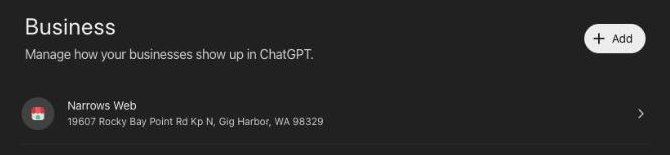 The business list after signing in. Captured November 10, 2026.
Find your business and check every detail
Ours was already listed (yours may not be), with our name, star rating, category, address, phone number and opening hours, on a card that looks a lot like a Google listing. Check each one. Our name showed as “Narrows Web” instead of our full name, Narrows Web Co.
Tip: write down anything that is wrong. OpenAI says verified owners can update their details, so you should be able to fix it once the checks in step 5 are done. We have not tried that yet. See the five things to check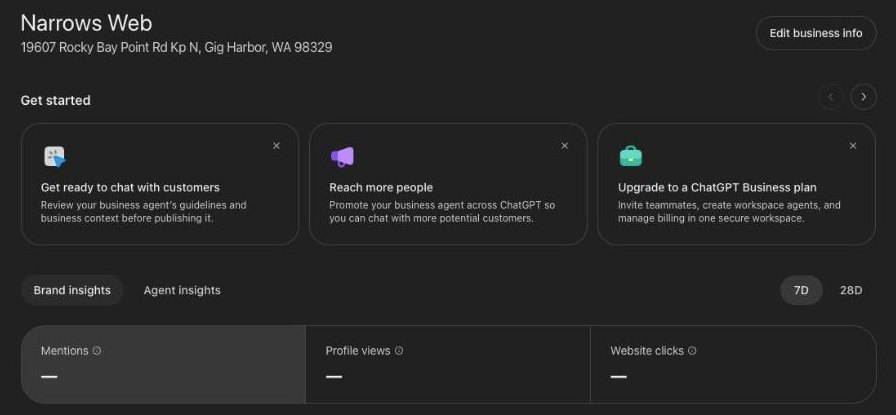 Our listing page in Business Hub after approval. The name and address are the first things to check. Captured November 10, 2026.
Prove you own your website (we used a DNS record)
ChatGPT asked us to add a DNS TXT record to our website address (our domain). A TXT record is a short line of text stored with your domain that proves you control it. Your web person, or the company you bought your domain from, can add it for you.
The screen gives you three boxes: Type (TXT), Name or host, and Value or content. Copy the name and the value exactly as your screen shows them. Ours named the www version of our address, so copy it www and all. Some domain companies add your domain to the end of the name for you; if yours does, leave that part off. The code stops working about 24 hours after ChatGPT gives it to you, so add the record the same day.
Add it. Do not swap it. This goes in as a new record. Nothing that is already there gets changed or removed, because some of those records carry your email.Verify that you control www.narrowsweb.com
Add this TXT record to the DNS settings for www.narrowsweb.com through your domain provider. Changes may take time to appear.TypeTXTName or hostopenai-business-claim.www.narrowsweb.comValue or contentRecord expires Nov 11, 2026 at 1:56 PMBackVerify domainThe DNS step, redrawn from our screen. We have covered our code.Click “Verify domain” and wait for the decision
Once the record is added, click “Verify domain.” You will see a screen that says “We're reviewing your claim,” with a note that OpenAI will email you its decision. We saw our approval inside Business Hub the same day. Yours may take longer.
Our screen also said DNS changes may take time to appear. If it does not verify straight away, give it a little time and try again.
We’re reviewing your claim for Narrows Web
- Claim received
We received your claim. You can withdraw your claim at any time during the review. - Review in progress
We’re reviewing your business information. - Decision reached
We’ll email you with our decision or if we need more information.
What we saw after clicking Verify domain, redrawn from our screen.- Claim received
Verify your identity, then wait for a review In progress for us
After approval we saw a banner asking us to verify our identity with a government-issued ID. ChatGPT says this is required before you can edit your business info. It asks for photos of your ID.
One of our photo attempts came back with “Couldn't verify photos” and a note to make sure the ID details are clear to read, with a Retry button. So take the photos in good light, with no glare. Upload them only on OpenAI's own screen, and never send ID photos by email or text to your web person, to us or to anyone else. After a retry, clicking “Edit business info” showed “Your business verification is under review.” We think that is the review of our ID check, but the screen does not say so. When we last looked, editing was still locked.
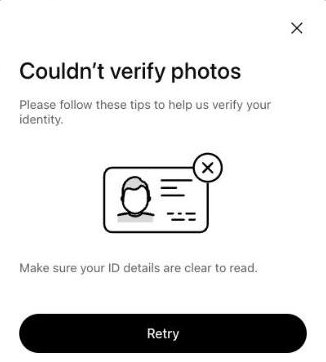
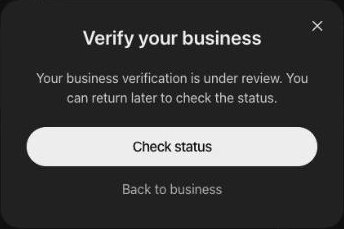 What we saw on one ID try, then after a retry. Captured November 10, 2026.
Fix your details and check your numbers Editing not tested yet
Once your checks are done, “Edit business info” is where you correct your details. We have not tested editing yet.
The Brand insights panel shows how many times ChatGPT mentioned you, how many times your profile was opened and how many times your website link was clicked, over the last 7 or 28 days. The page says Profile views count opens of your profile in ChatGPT, and Website clicks count clicks on your website link. Further down there is a “Top 5 discovery topics” table. Ours was all empty on day one, with a note that numbers and topics show up once there are enough mentions.

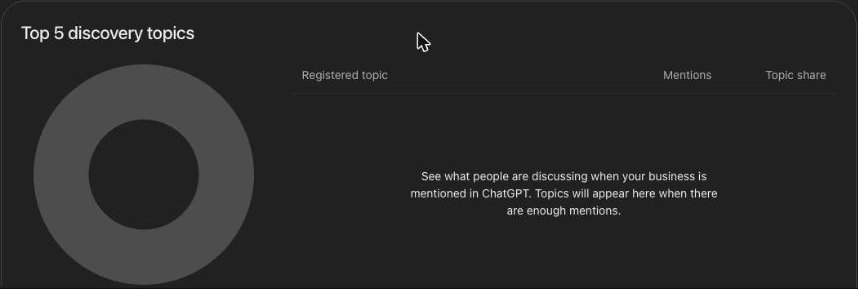 Our numbers on day one: nothing yet. Captured November 10, 2026.


Send this to your web person
You do not have to add the record yourself. Copy this note, paste in the lines from your Business Hub screen, and send it to whoever looks after your website or your domain.
Hi [name],

I am claiming our business listing in ChatGPT. To prove we own our website, OpenAI needs one TXT record added to our domain, [yourwebsite.com].

1. Please add it as a NEW TXT record. Do not change or remove any record that is already there, including the ones that carry our email.
2. Copy the name and the value exactly as they are below, www and all if it is there.
3. Tell me as soon as it is saved. The screen shows when the code expires, copied below.

Type: TXT
Name or host: [paste from your screen]
Value or content: [paste from your screen]
Record expires: [paste the date and time from your screen]

Thank you.

Where our claim stands
As of November 10, 2026
- Signed in
- Found our listingIt was already there
- Added the DNS record
- Claim approvedThe same day
- ID photosRetried
- Business checkUnder review
- Edited our detailsLocked so far
- NumbersEmpty so far
ChatGPT had already checked our website before we claimed anything
Our Business Hub dashboard has a panel called “Website access.” It showed our website address, the words “Access confirmed,” and “Last updated Nov 2, 2026.” That is eight days before this launched and before we claimed anything. So ChatGPT had already reached our site. The panel does not say how much of it was read.
The panel also says a re-crawl (a repeat visit) “visits eligible linked pages,” which means it follows the links on your site to your other pages.
What this tells you: your listing is tied to your website address, and ChatGPT looks at your site. OpenAI has not said how it picks the details it shows, and we do not know whether a better website changes what ChatGPT says or recommends.

Three things worth checking on your own site General good practice, not something the panel told us. We are not promising it changes what ChatGPT shows.
- Your name, address, phone and hours are written on the site as text, not only inside a picture.
- Each service you offer has its own page, linked from your menu.
- The towns you work in are named in words on the site.
Not known yet: what the panel shows when access fails, or how often ChatGPT comes back.

Five things to check on your listing
- Your name. Is it your full business name? Ours was cut short.We saw this
- Your address. Is it written the way you write it? Ours added “Kp N”.We saw this
- Your phone number. Tap Call and make sure it rings your phone.General knowledge
- Your hours. Check weekends and holidays too.General knowledge
- Your category. Does it say what you do?General knowledge
Keep your name, address and phone the same everywhere. Your website, your Google Business Profile, Facebook, Yelp and now ChatGPT should all match. A customer who sees two phone numbers does not know which one to call. We do not know how ChatGPT picks the details it shows, so we are not promising this changes your listing there. It is good practice either way.
Who can claim, and what you can skip
Claiming a listing
OpenAI says any eligible business in a place where ChatGPT is available can claim. Shopify stores can connect from Business Hub or from their Shopify admin. OpenAI Enterprise customers and existing OpenAI advertisers can work directly with their OpenAI representative.
A chat agent
After claiming, some businesses can build a chat agent (OpenAI calls it a Business Agent) that answers questions on their ChatGPT profile. Right now OpenAI says that is only open to eligible online stores and online service businesses in the US.
Ads and the Business plan
Our dashboard also showed an “Advertise on ChatGPT” card and a card suggesting a ChatGPT Business plan. You do not need either one to claim your listing. We have not tried the ads.
What we have not tested
- We are a local service business, so we did not try the chat agent or the product listings with prices that online stores can add.
- We retried our ID photos. Our business verification was still under review when we last looked. So we have not edited our listing, and we do not know which details you can change, our name included.
- We only know the website route to verify a claim, because it was the only one we were shown.
We will update this page as we learn more.
Common questions
Does it cost anything?
Claiming did not require a ChatGPT Business plan. After we were approved, Business Hub suggested upgrading to a Business plan for things like inviting teammates. You do not need it to claim your listing.
Will claiming bring me more calls or put me higher in ChatGPT's answers?
We do not know yet. It is brand new. We have not measured it, and we have not seen anyone publish a measurement of whether a claimed listing gets recommended more often. What claiming does, according to OpenAI, is let verified owners update their details and see how often they come up.
Can I build a ChatGPT chat agent for my business?
Probably not yet if you are a local trade. OpenAI calls these Business Agents and says they are open to eligible online stores and online service businesses in the US right now. A plumber or roofer is not an obvious fit, so check OpenAI's Business Agents policy for the categories it covers. OpenAI says it plans to expand to more markets and kinds of business over time.
Can I see what people asked ChatGPT about me?
No. OpenAI says insights are added together across many conversations, and only shown once there are enough of them to protect people's privacy. You do not see the conversations. You see counts, plus the topics of conversations where your website was cited.
What if I do not have a website?
We have not tried claiming a business that has no website, so we cannot tell you how that works. The only way we were shown was proving we own our website.
Can you do this for me?
If you are one of our clients, ask us and we will walk you through it and help with the DNS record. The ID check uses your own government ID. Do that part yourself, on OpenAI's screen, and do not send us the photos. OpenAI decides whether a claim is approved.
Sources
Read on November 10, 2026. OpenAI’s announcement of Businesses in ChatGPT (what it is, who can claim, insights and privacy, chat agents). ChatGPT Business Hub, where we claimed our own listing the same day. Pictures marked as illustrations are AI-generated for this page. Screens are captures from our own account, redrawn where noted. Narrows Web Co. is not affiliated with or endorsed by OpenAI. ChatGPT and OpenAI are trademarks of OpenAI.
Page history
November 10, 2026: published, the day we claimed our own listing.